Photoshop is such a great design tool. I have the little Elements version — but it never ceases to amaze me. I don’t know what I would do without it. Julie Hirota showed me how to manipulate a piece of my work in Photoshop a couple of years ago — and I still use it a lot. It is always easier to visualize the piece before you cut everything out & then see your mistakes.
This morning I’ve been looking at my latest piece trying to decide what to use for the background — and if I should change the brown in the background of the hair. Stacy West suggested I use black for the background — and then I added some lines in a light blond/orange color for the quilting lines.
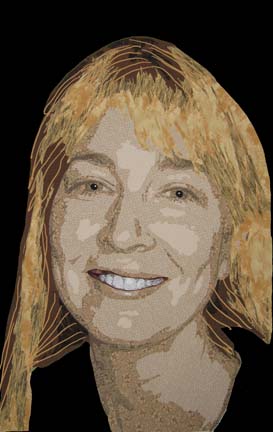
I think that the dark brown will work fine once I add the lighter color thread in the quilting stage. I tried to use a color closer to ash as a substitute — but then it kept fighting with the 3rd value range in the skin.
And I love the black. I haven’t decided if I’ll also use it for her shoulders or not.
I like the black background. Another wonderful portrait. I also have photoshop Elements 5.0. If you ever share how you manipulate the photo in this program, please let me know. I use it for basic photo enhancement but would love to know how to use it as you do for your portraits.
She looks terrific! I never would have thought of using commercial prints for the face, but it looks great! I like the black background and I enjoyed seeing all the steps along the way.